Skip to content
Wave Engine

Measure each wave against the one before

Measure each wave's distance, duration and volume, and compare it with the previous wave in the same direction, with Wave Engine.
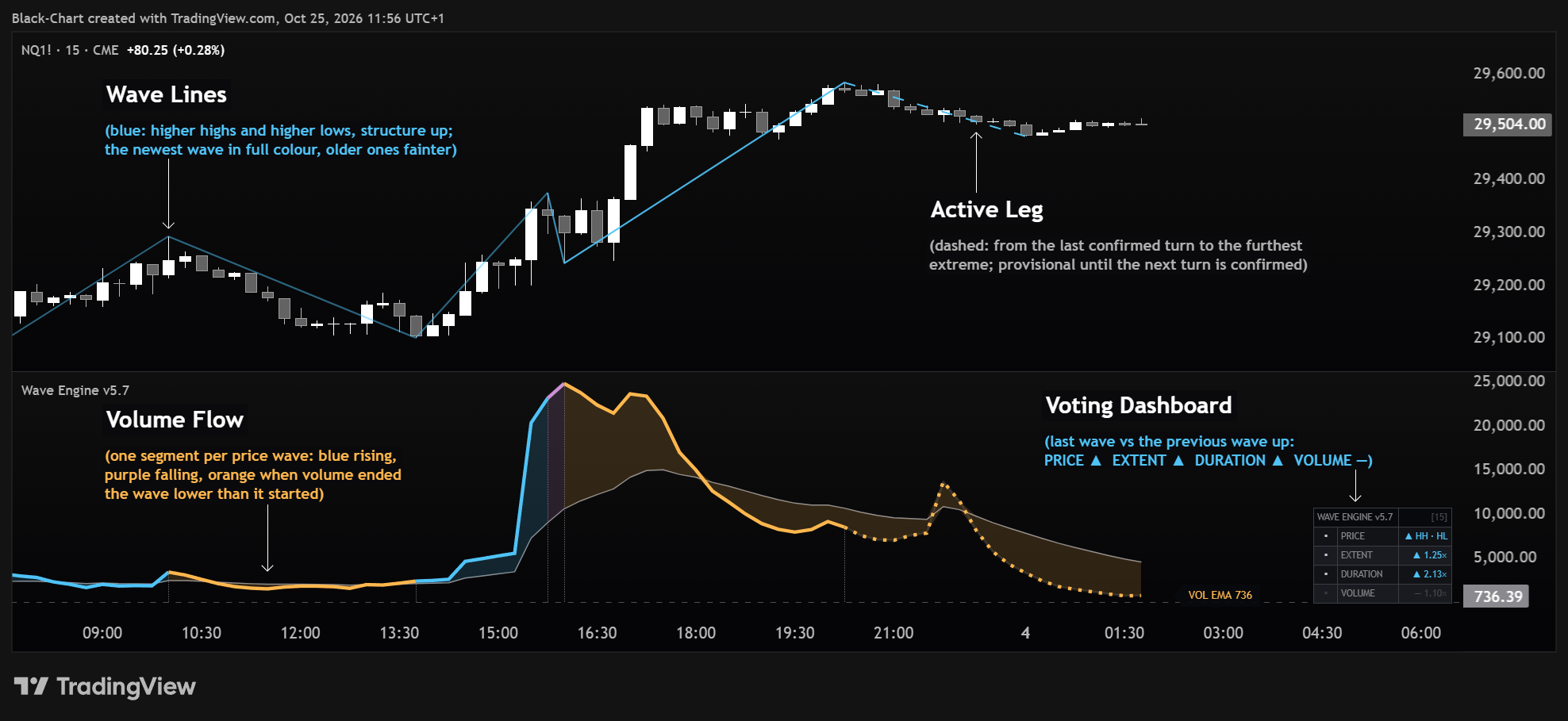
Wave Engine on a Nasdaq futures 15-minute chart: wave lines, the active leg, the Volume Flow curve in the lower pane and the voting dashboard, every element annotated.
Compare wave with wave
Read volume behind movement
Measurements, not signals

The flow layer of BlackChart

Wave Engine is the volumetric wave analyst of the BlackChart Suite. It draws market waves and measures each completed move: distance, duration and volume. It then compares that wave with the previous wave in the same direction and shows the result as plain ratios.

It does not assign Wyckoff event labels, predict exhaustion, or tell traders what a wave means. Its job is to make the underlying measurements clear so the trader can interpret them alongside the rest of the BlackChart framework.

The goal is simple: measurements first, interpretation second.

Core purpose

Wave Engine exists to make wave analysis measurable. Price can move the same distance with very different volume and duration, so distance alone does not describe the quality of the move.

By reporting the core measurements of each wave, Wave Engine gives traders clean raw material for comparing recent bullish and bearish movement without turning those measurements into automatic verdicts.

Wave Engine on a Nasdaq futures 15-minute chart: wave lines, the active leg, the Volume Flow curve in the lower pane and the voting dashboard, every element annotated.

What problem it solves

Wave analysis becomes subjective when traders judge a move only by how it looks. A fast move, a long move, or a high-volume move can each tell a different story depending on how those measurements relate to one another.

Wave Engine solves this by presenting the measurements directly. The trader can compare how far price travelled, how much volume traded, how efficient that movement was, and how long it took.
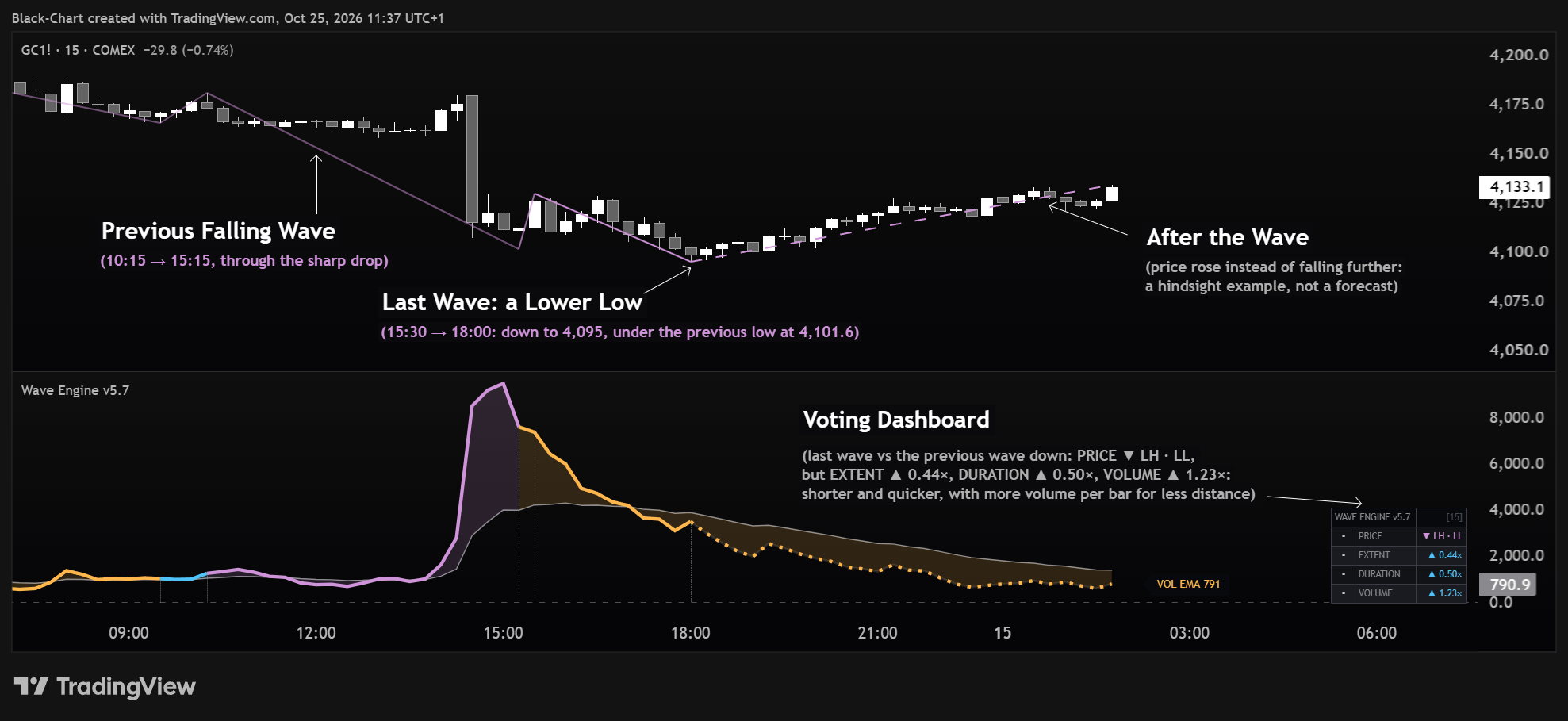
The voting dashboard on a gold futures 15-minute chart: a lower low with PRICE down, while extent, duration and volume read against the falling wave.

What it reads in the market

  • Wave structure: higher highs and higher lows, or lower highs and lower lows
  • Extent: how far the wave travelled compared with the previous wave in the same direction
  • Duration: how many bars it took compared with the previous wave in the same direction
  • Volume: the wave's volume intensity compared with the previous wave in the same direction
  • Volume inside the wave: whether it ended higher or lower than it started, and whether its peak came before, on or after the price pivot
  • The active leg, kept visually separate from confirmed waves
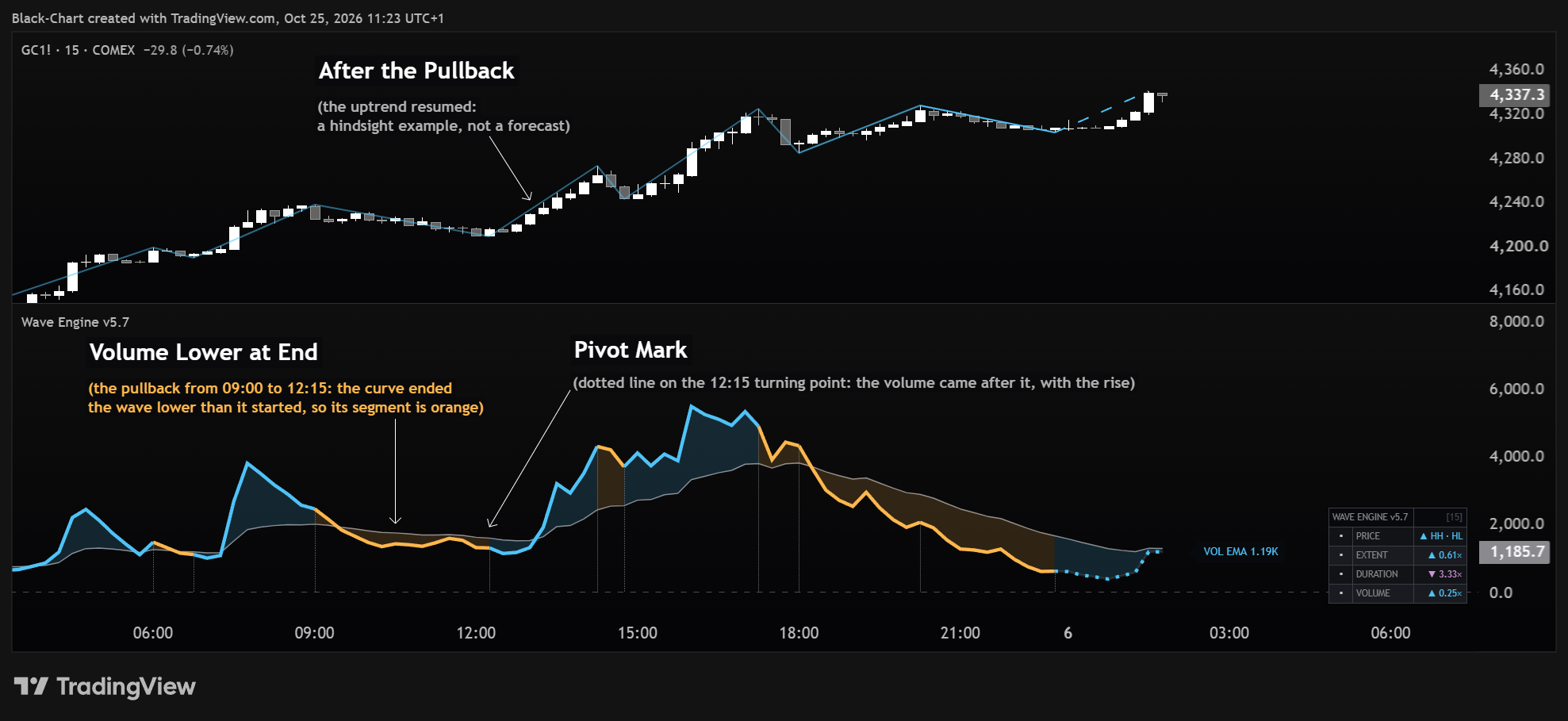
Volume Flow on a gold futures 15-minute chart: an orange segment where volume ended a pullback lower than it started, and the pivot mark after which the curve turns up.

Key features and visible components

  • Wave and ZigZag display: completed waves drawn over price, coloured by structure, with the active leg dashed and optional volume, bar count and distance labels.
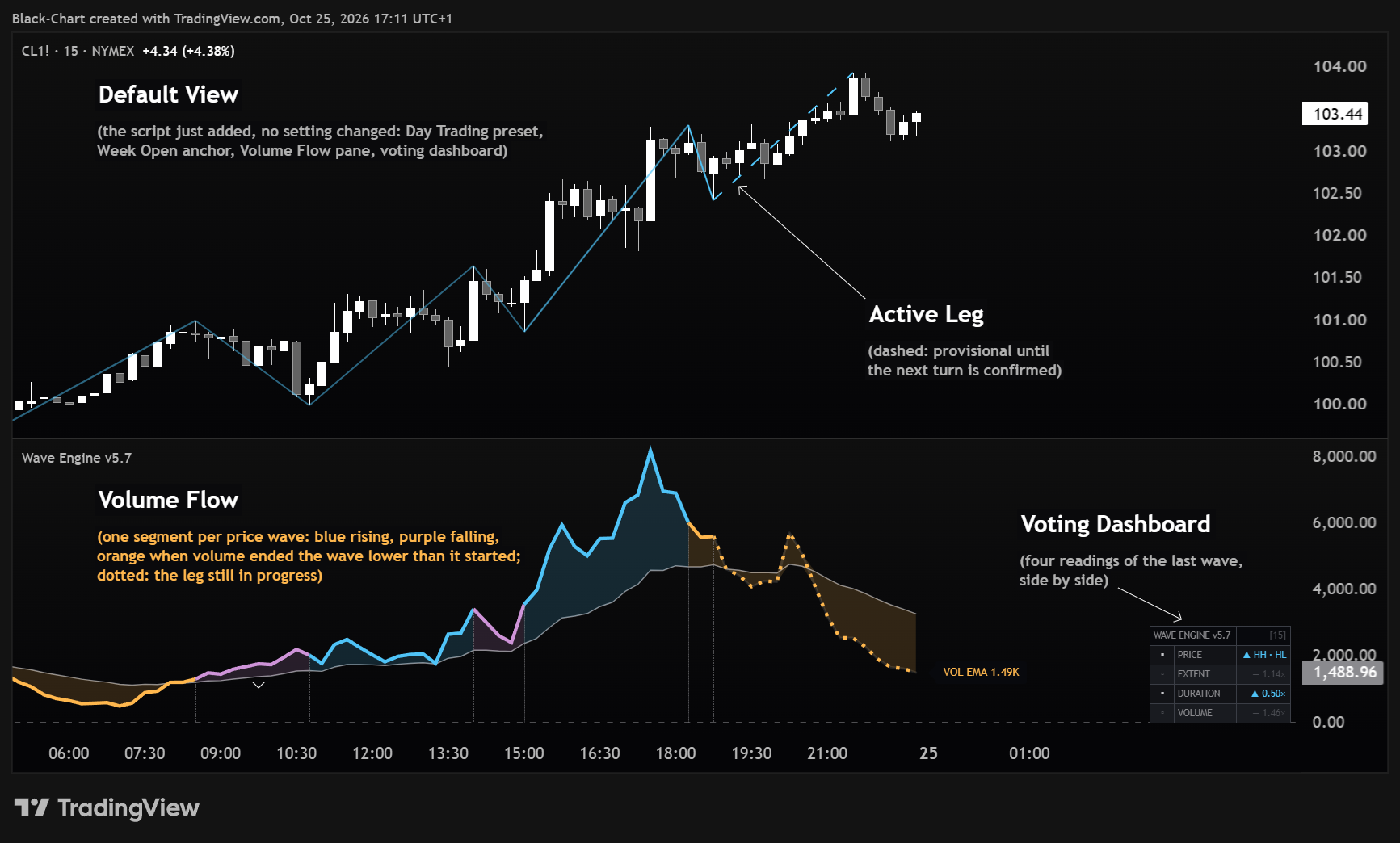
  • Volume Flow (default pane view): a smoothed volume curve cut into one segment per price wave. The colour of each segment shows whether volume ended higher or lower than it started.
  • Pivot Marks: a thin dotted mark on the bar of every price pivot, where one wave ends and the next begins. It shows at a glance whether the peak of volume came before, on or after the turn.
  • Wave Volume (pane view): the volume of each price wave, added up bar by bar from the pivot where the wave starts. It restarts at every pivot, so at the end of a wave its height is that wave's total volume.
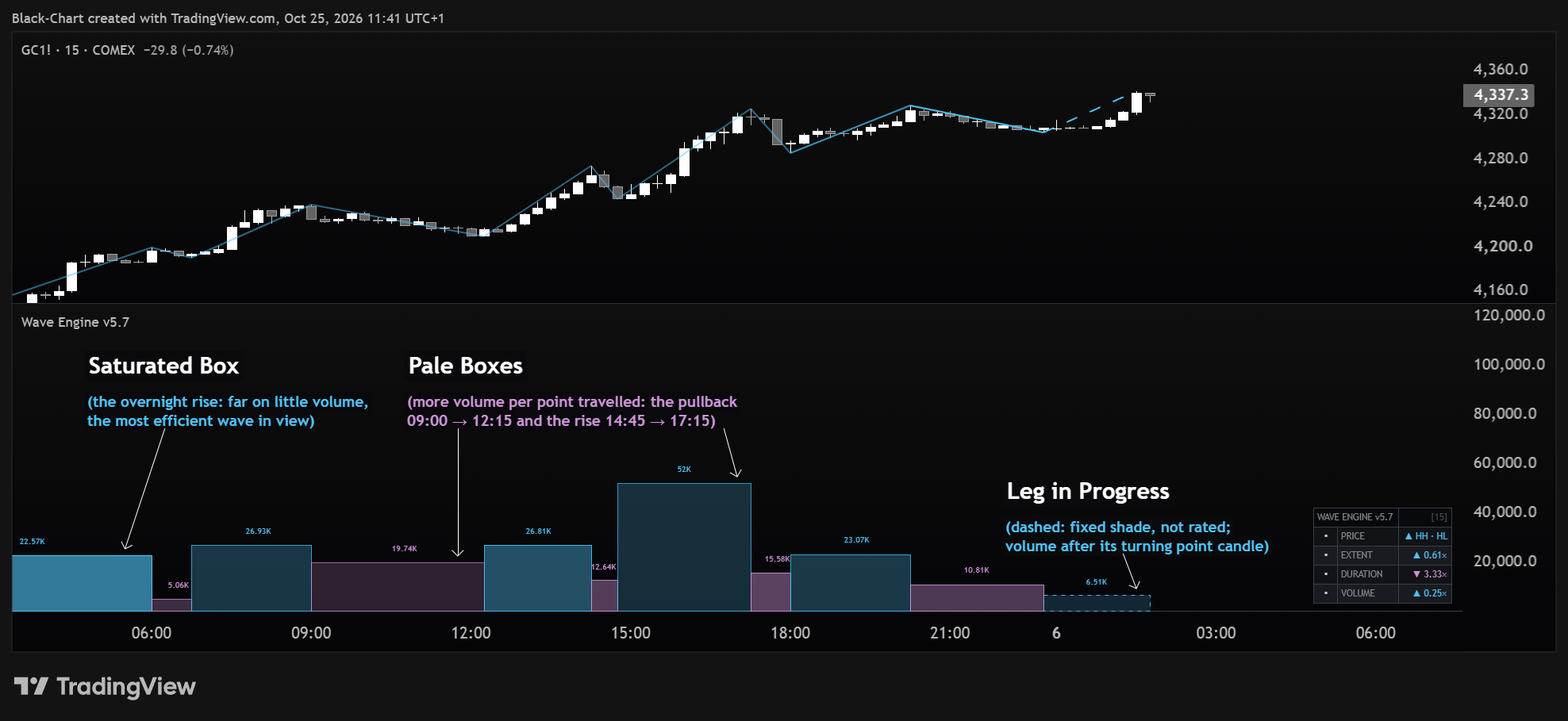
  • Wave Boxes (Weis-style view): one box per wave, where height is the wave's volume and colour intensity is price-to-volume efficiency.
  • Dashboard: four rows — PRICE, EXTENT, DURATION and VOLUME — each comparing the last confirmed wave with the previous wave in the same direction. The rows are shown side by side and are never added into a score. The classic panel (thrust ratios, last waves, active leg) is one switch away.
  • Anchor: measurement starts from Today, Week Open, Month Open, or a manually selected point.
  • Wave Presets: Auto, Scalping, Day Trading, Intraday, Swing and Position control wave sensitivity while adapting to volatility.
Wave Boxes on a gold futures 15-minute chart: one box per wave, as tall as its volume, a saturated box for the most efficient wave and pale boxes where volume covered little ground.

How it fits into the 4-pillar framework

Wave Engine is the third pillar of the BlackChart decision chain: flow. Deep Flow provides market context and Structural Decoder maps the structural field. Wave Engine then supplies the measured facts behind the movement itself.

The trader interprets those measurements before moving to Smart Money Radar for liquidity and execution context. Wave Engine reports the data; it does not supply the verdict.
How traders can use it

  • Choose the reference period that matches the range being analysed.
  • Read PRICE for the structure of the waves.
  • Compare EXTENT, DURATION and VOLUME: did the last wave travel further, take longer and trade with more intensity than the previous wave in the same direction?
  • Use Volume Flow to see how volume developed inside each wave, and the pivot marks to see whether its peak came before, on or after the turn.
  • Interpret the measurements together with Deep Flow context and Structural Decoder structure, not as standalone trade signals.
Wave Engine with its default settings on a crude oil futures 15-minute chart: wave lines, the active leg, the Volume Flow curve and the voting dashboard.

When not to use it

Wave Engine should not be treated as a signal generator, a breakout trigger, or an automatic Wyckoff-event detector. Its arrows show which side a comparison leans to; they are not a call to act.

Early in a reference period, or on a high timeframe with too few bars inside the selected range, there may be too little data to form useful waves. In that case, use a broader reference period or a timeframe that provides enough bars for the analysis.

The Week Open anchor on a Nasdaq futures 15-minute chart: no waves before the anchor, and the first turning point of the week fixed on the next candle.

Why it matters

Wave Engine matters because movement is easier to compare when the underlying facts are visible. Distance, volume, efficiency and duration give traders a measurable way to examine opposing waves without relying on visual impression alone.

Inside BlackChart, Wave Engine provides the flow layer between structural context and execution context while keeping the distinction clear: the indicator measures, the trader interprets.

get started

Align your execution with market reality

Access a professional toolset built on Wyckoff logic, volume, and liquidity. No automation. No simplification. Only structure.