The market's skeleton on one chart: where liquidity rests, which higher-timeframe levels matter, where structure shifts, whether price sits in premium or discount, and which classic chart patterns its swings are drawing. A clean map of context — so you always know where you are before deciding what to do.
What it maps
Each layer is an independent module you can switch on or off. Together they draw the structural picture of the market.
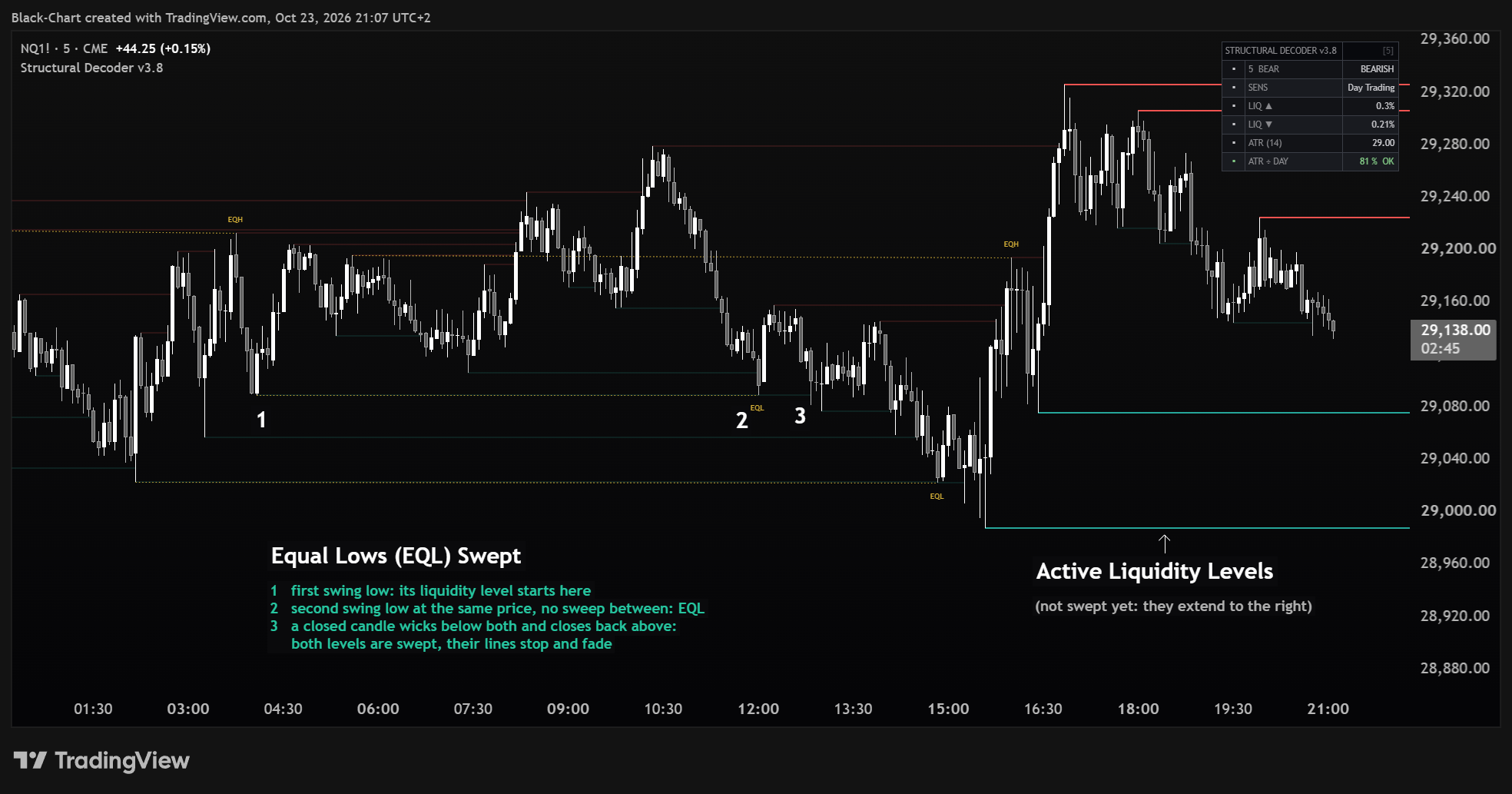
Swing highs & lows where stops rest — fading once price sweeps them.
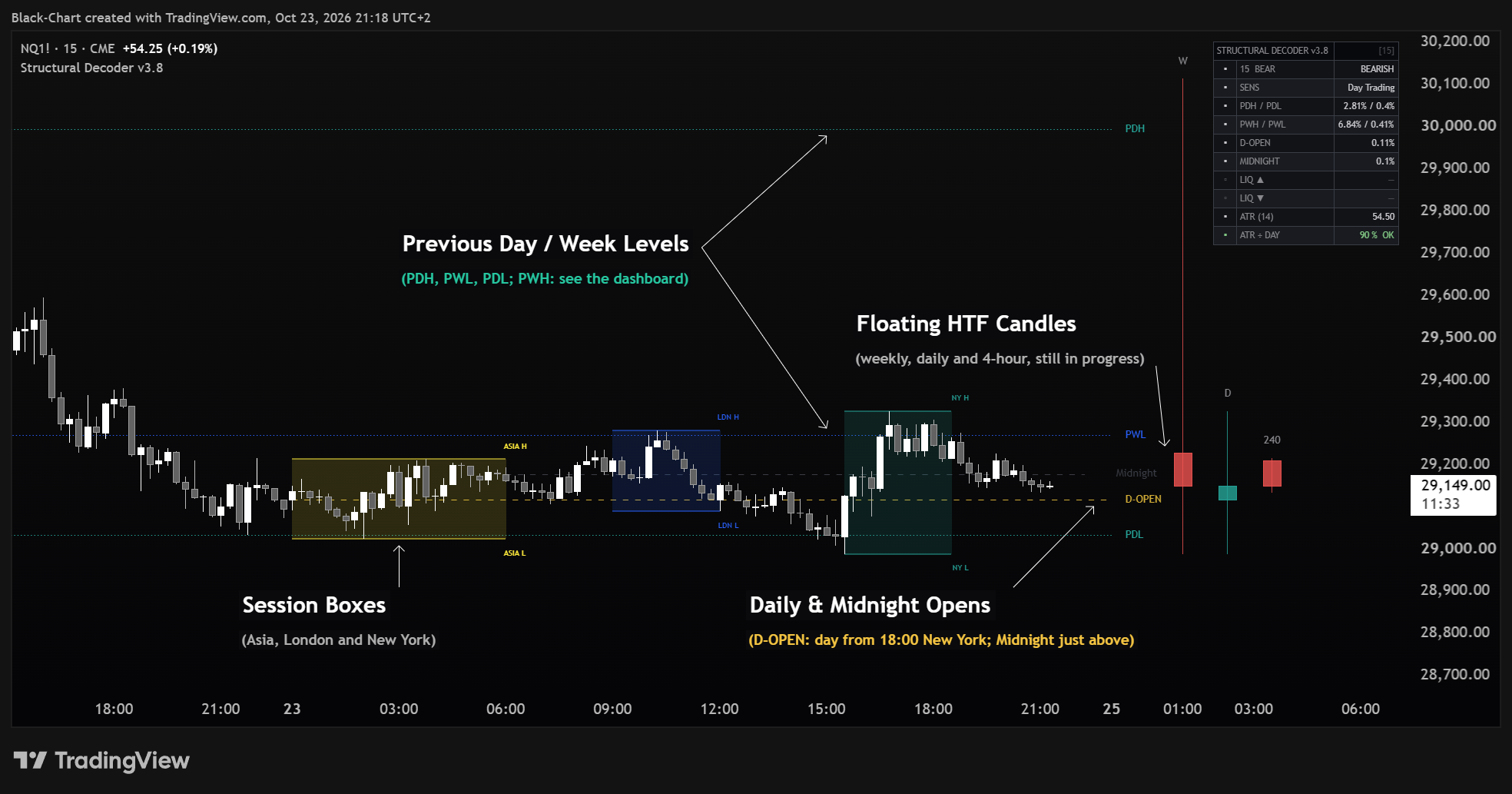
Previous Day, Week & Month highs and lows (PDH/PDL · PWH/PWL · PMH/PML).
The session and midnight opening prices — key intraday references. Off by default.
CHoCH & BOS labels marking each close-confirmed, momentum-filtered shift and continuation.
EQH & EQL — clustered liquidity, a common sweep target. Off by default: switch it on in Equal Highs / Equal Lows.
The dealing range split at equilibrium (50%) — expensive vs cheap.
Asia, London & New York, plus two opening-range windows — each with its high/low.
Higher-timeframe candles (W · D · 4H) parked beside price.
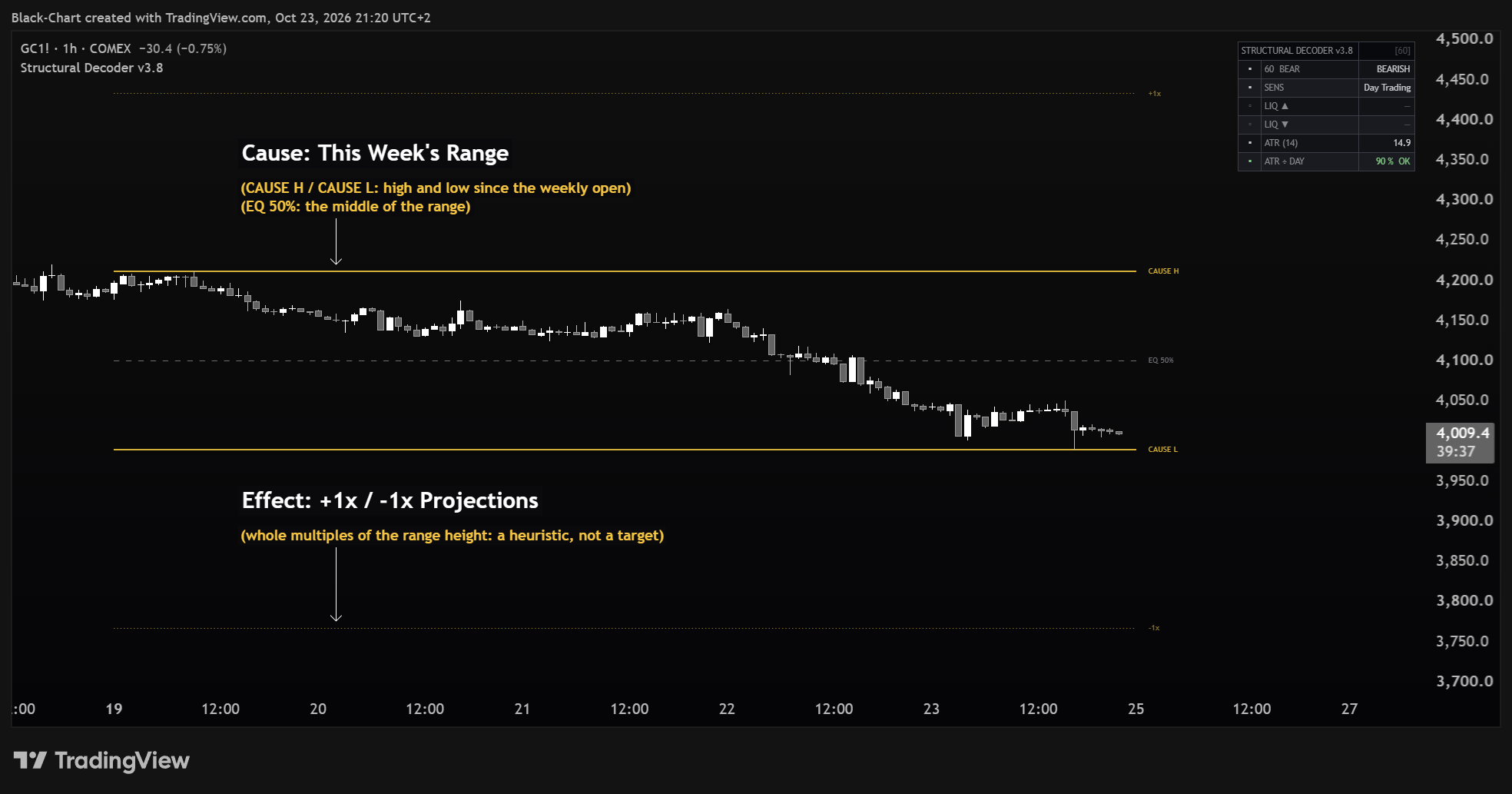
Mark a congestion and project its range — ±deviations and the 50% equilibrium. Cause & Effect.
Head and shoulders, double and triple tops and bottoms, cups, triangles, flags — drawn on their own swings, then marked ✓ when structure breaks their line, or ✕ when price takes their invalidation level first.

Quick start
Open it from your indicator list in TradingView and apply it. It draws as an overlay on price.
It opens clean — a few essential layers on, the rest one toggle away. In the settings each module has its own on/off switch; keep the layers that fit how you trade.
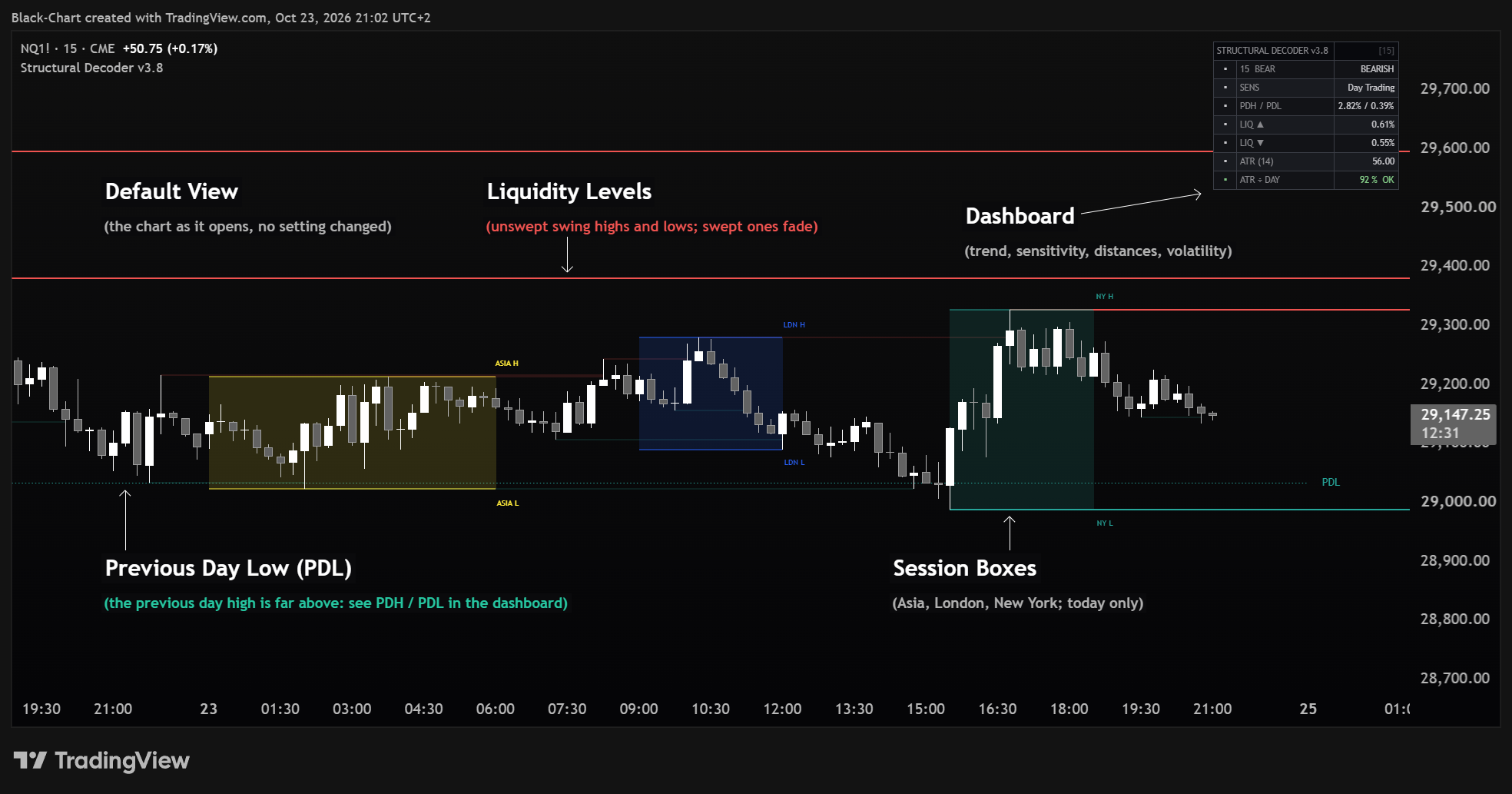
Top-right panel gives you the structural trend and your distance to the key levels at a glance — the fastest orientation on the chart.
Reading the chart
Here's what each layer looks like and what it's telling you.
Solid lines at swing highs (red) and lows (green) — where resting orders sit. A line appears a few candles after its swing, once the swing is confirmed by closed candles. When a candle's wick goes through a level, at that candle's close the line stops there and fades: that liquidity has been taken. To delete swept lines instead, keep Mitigated Display ticked and set the menu beside it to Remove — unticking the box does not hide them. Liquidity Display Limit counts the untouched lines on each side; faded lines are not counted, and untouched levels that grow very old are removed.
Dotted lines for previous Day / Week / Month highs and lows (only Day is on by default). Dashed lines for the opens — gold for the Daily open, dark grey for the Midnight open — both off by default. Only the current levels are drawn. The Daily Open is taken at the first candle from the Session Start Hour (18:00 New York by default, as on CME futures): on markets closed at that hour, such as most stocks, set the hour of their open or it will not appear. The reference points higher-timeframe traders watch.
CHoCH (Change of Character) flags the first shift against the current structure; BOS (Break of Structure) marks continuation in the same direction. Green = up, red = down. A label is placed at the close of the breaking candle, and only when the break has enough momentum and is not too close to the previous one; weaker breaks get no label and do not change the trend. Off by default: switch the labels on in SMC - Market Structure (the trend in the panel works with the labels off).
Gold EQH / EQL mark two highs (or lows) at nearly the same price, with no trade beyond the first in between (on a long gap only the candles closest to the second are checked) — pooled liquidity that price may come back to sweep. Off by default: switch it on in Equal Highs / Equal Lows.
The current dealing range, split at the 50% equilibrium. Above EQ = premium (expensive); below = discount (cheap). Frames where price is relative to its own range. It is an equilibrium reference: in a strong trend the range re-extends on each BOS and the equilibrium keeps moving — read it as “where price sits in the range”, not as a standalone reversal signal. It appears after the first CHoCH and shows only the current range, from the CHoCH candle to just past the last candle. Off by default: switch it on in Premium / Discount.
It measures a range's high/low (the Cause) and projects whole multiples of its height — +1x and -1x, +2x and -2x by default — plus the 50% equilibrium (the Effect): a measured-move frame read as Wyckoff's Cause and Effect, a heuristic and not a target. In Auto (weekly) the range starts at the open of the instrument's trading week; in Manual (drag) you mark the start and end by dragging the anchors on the chart. Off by default; for a genuine read, anchor it on a real congestion, not an impulse.
Translucent boxes for Asia, London and New York, plus two opening-range windows (gold, off by default) for the first minutes of the European and US opens — from 09:00 and 15:30 in the session Time Zone, Europe/Rome by default (on a 15-minute chart the window takes two candles). Each box tracks its own high and low; the H / L labels appear when the session ends. Times follow the chosen Time Zone: in the weeks when Europe and the US change clocks on different dates, the New York boxes sit one hour late. Not drawn on daily and higher timeframes. Opening-range boxes read best on low timeframes.
The live Weekly / Daily / 4H candles parked to the right of price. Higher-timeframe bias without leaving your chart's timeframe. Each candle is labelled with its timeframe as set (W, D, 240). Off by default: switch them on in Floating MTF Candles (Enable MTF Candles).
Classic figures drawn as a thick outline on their own wave swings, one colour per family, with a short code (H&S, 2B, 3T, F+…) — hover it for the full name. The dashed line is the breakout line (neckline or boundary). A ✓ marks the candle where a close-confirmed, momentum-filtered break of structure (CHoCH or BOS) closes beyond that line in the pattern's direction; a ✕ marks the candle where price takes the pattern's invalidation level first. If either happened while the last swing was still being confirmed, the mark sits on the candle where the pattern appears (its tooltip says how many candles earlier). A pattern appears only when its last swing is confirmed, a few candles after it; one that gets neither mark within a span as long as the pattern itself stays unmarked (EXPIRED in the panel). With Allow overlapping patterns off (the default) patterns never overlap — except that a head and shoulders or a triple is drawn even around a weaker pattern, as long as it does not overlap another head and shoulders or triple. Off by default: switch it on in Chart Patterns.

How to read the patterns. A pattern describes the shape the swings have drawn — it is a reading, not a signal. The ✓ says that structure has broken the pattern's line in its direction; it does not say how far price will travel. On gold, S&P 500 and Nasdaq futures (hourly bars 2023–2026, 5-minute bars June–September 2026, every figure on), after a ✓ price reached a move equal to the pattern's height before returning to its opposite extreme about as often as it did from random candles over the same distances — about half the time in both cases, and slightly less often for head and shoulders: use the patterns to read the shape of the market, together with the levels and the structure, not as a reason on their own. To see fewer, cleaner patterns, set Pattern precision to Strict or lower the Double / triple tolerance (% of height).
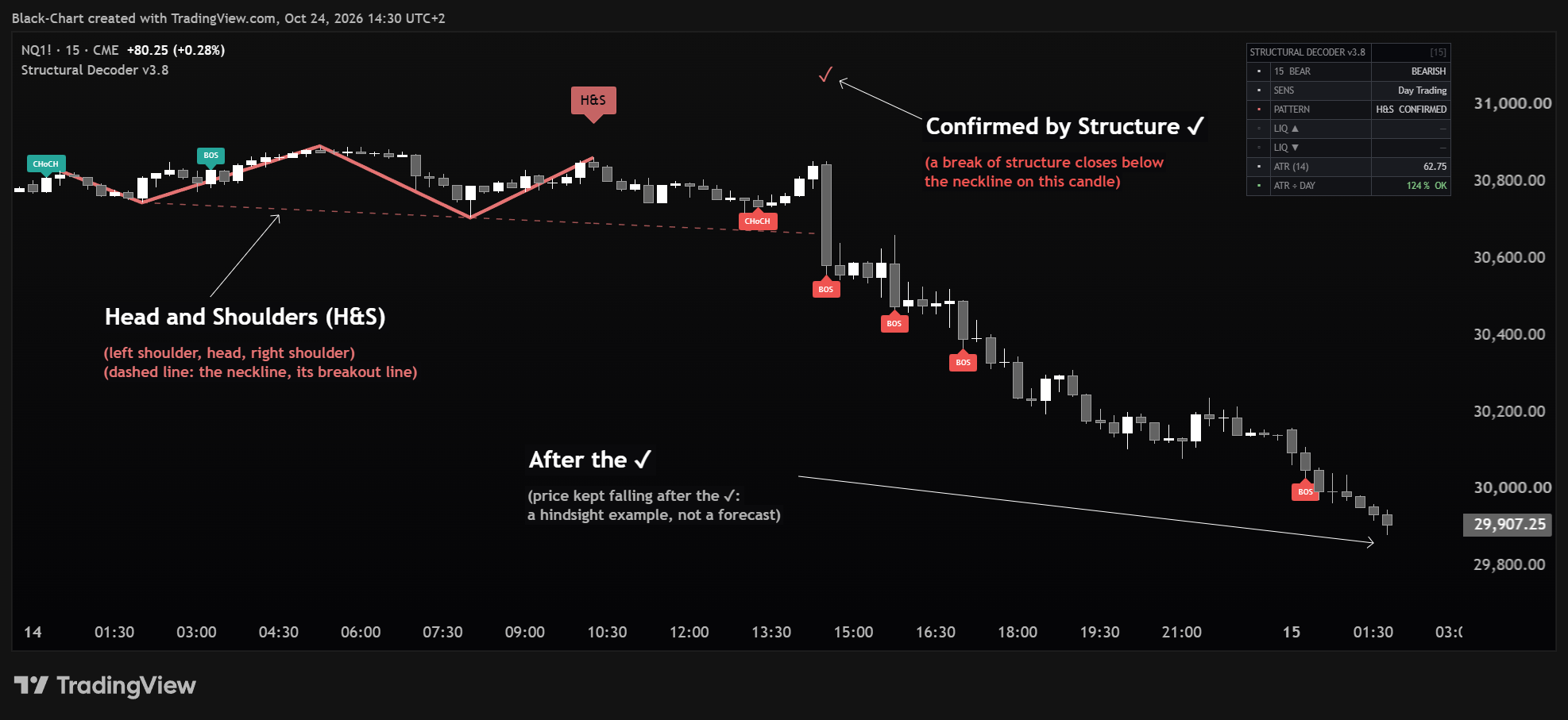

What the chart does on its own. Liquidity lines, EQH / EQL and the pattern swings appear a few candles after the high or low that forms them, once the swing is confirmed. Sweeps, CHoCH / BOS, ✓ and ✕ are decided at the close of the candle: on the candle still forming no line fades and no CHoCH / BOS, ✓ or ✕ appears yet. The previous-period levels, the opens, the Premium / Discount zone, the Range Projection and the floating candles show only their current state, redrawn on the last candle — scroll back and you will not find past ones. Only the most recent CHoCH / BOS labels, EQH / EQL marks, session boxes and patterns are kept; older ones are removed as new ones arrive. An EQH / EQL stays on the chart after the level is swept.
The dashboard
The Chrome-terminal panel (top-right by default) is the quickest read on the chart. It shows:
The structural trend set by the last CHoCH/BOS; a change shows only once it has held for a few candles, to avoid flip-flopping. FLAT (NO TREND) appears only until the first break of structure on the loaded history: it is not a ranging signal.
The Structure Sensitivity level in use — Scalping · Day Trading · Intraday · Swing · Position (or Auto→level adapted to the timeframe).
How far price sits from each MTF level and open you have switched on — PDH/PDL by default; weekly, monthly and the opens add a row when enabled — as a live percentage. The percentage has no sign: it says how far, not on which side.
The last pattern drawn and where it stands: PENDING · CONFIRMED · INVALIDATED · EXPIRED (NONE YET until the first pattern). Shown only while Chart Patterns is on.
Distance to the nearest un-swept high line (▲) and low line (▼), among those drawn on the chart. Shows — with Liquidity Levels off; a lower Liquidity Display Limit can change it.
The average true range in price, and the same ATR as a percentage of its own average over as many candles as make up 24 hours on the chart's timeframe (on markets that do not trade around the clock this spans more than one session): green OK at a normal level of activity, red LOW when the market has become clearly quieter than usual, where moves and patterns come out smaller. ATR ÷ DAY shows — on daily and higher timeframes and on non-time charts (Renko, Kagi, Point & Figure, Line Break, Range).
Position and size are configurable (Dashboard Settings). It starts at Small; pick Medium or Large for bigger text — or turn it off entirely.
The settings panel
Open the gear icon. Settings are grouped by module — turn a layer on/off with its own switch, then fine-tune. Sensible starting points below.
Changed too many settings, or is the indicator behaving oddly? No problem: open the indicator's Settings (Inputs) and click Reset settings — the button at the bottom-left of the dialog — to return everything to the correct defaults.
| Group | What it controls | Start with |
|---|---|---|
| Liquidity Levels | Show the liquidity levels. High in red, Low in green. The related controls sit in the three groups that follow: Sweep / Mitigation (swept levels fade; tick Mitigated Display and choose Remove to delete them), Display (how many untouched levels to keep on each side) and Liquidity Style (colour, width, style). | defaults |
| Structure Sensitivity | A single preset setting how reactive structure & liquidity detection is: Scalping · Day Trading · Intraday · Swing · Position · Auto (≤5m Scalping · ≤15m Day Trading · ≤1h Intraday · ≤1D Swing · above Position). Scalping = most reactive; Position = smoothest. | Day Trading |
| MTF Highs/Lows | Toggle Daily / Weekly / Monthly previous highs & lows, with per-level colour, width and style. Daily green, Weekly blue, Monthly violet. | Daily on |
| Daily & Midnight Opens | Show the opens, set the daily-reset hour and timezone (default 18:00 = CME Globex; forex 17:00). | defaults |
| SMC - Market Structure | CHoCH/BOS labels and their colours (bullish / bearish). | defaults |
| Equal Highs / Equal Lows | Show EQH/EQL and their colour. | defaults |
| Premium / Discount | Show the zone (the dealing range split at the 50% equilibrium) and the premium, discount and equilibrium colours. | off |
| Range Projection (Cause & Effect) | Range Anchor: Auto (weekly) anchors the range to the open of the instrument's trading week, or Manual (drag) to mark it by dragging the anchors on the chart. Plus deviations (±N), 50% equilibrium toggle and colours. | off · Auto |
| Session Boxes | Five sessions — the three main sessions (on) plus two opening-range windows (off by default). Each with its own on/off, time window, colour and name. Timezone, H/L labels, Max Days Back (0 = all) (days of history to show) and Hide Above TF (minutes, 0 = never) (hide above a timeframe, in minutes). | 1 day · H2 |
| Floating MTF Candles | Up to three higher-timeframe candles, their timeframes, spacing and distance from price. | off · W · D · 4H |
| Dashboard Settings | Show the panel, its position and size (Small / Medium / Large), and the two ATR rows: ATR (14) and ATR ÷ DAY. | Small · ATR on |
| Chart Patterns | Classic chart patterns, drawn on their own wave swings (the swing size follows Structure Sensitivity). Allow overlapping patterns: off = one pattern at a time, except that a head and shoulders or a triple is drawn even around a weaker pattern, unless it overlaps another head and shoulders or triple. Plus the breakout line, the ✓ / ✕ marks, grey-out against the trend, how many to keep, line width and label size. | off |
| Chart Patterns — Figures | One switch per figure, bullish and bearish side by side: head and shoulders, double and triple tops and bottoms, cup and handle, symmetrical, ascending and descending triangles, rectangles, rising and falling wedges, flags and pennants. Double / triple tolerance (% of height): how level the tops (or bottoms) must be, as a percentage of the pattern height. Pattern precision: Strict · Standard · Loose — how clean the shapes must be: flat lines, shoulders and neckline, cup rims and flag channel. It leaves the double / triple tolerance as set, except that Strict puts a ceiling on it. Not every figure starts on: double top, inverse cup, ascending, descending and bullish symmetrical triangles, rectangles, wedges and the bearish pennant are off. | 10 · Standard |
| Chart Patterns — Colours | One colour per family — head and shoulders, double / triple, cup, triangle, rectangle, wedge, flag / pennant — plus the grey used against the trend. | defaults |
Cleaner session boxes. Two controls in the Session Boxes group keep the chart tidy. Max Days Back (0 = all) limits how many days of boxes and labels stay on screen — 1 = current day only, 0 = no limit by days (on long histories the oldest boxes and labels are still removed). Hide Above TF (minutes, 0 = never) auto-hides boxes and labels (ASIA/LDN/NY H-L) above a chosen timeframe — default 120 minutes (H2), so on H4 and above the chart stays clean without disabling the indicator. Session boxes are never drawn on daily and higher timeframes, even with Hide Above TF at 0.
Range Projection in Auto: early in the week you may see little — that's normal. In Auto (weekly) the range starts at the open of the instrument's trading week, in the exchange's timezone and not yours — Monday morning on stocks, Sunday evening on forex and futures, Monday 00:00 UTC on crypto — and restarts on its own every new week: right after it opens the week has moved little, so the zone is small until the week develops — on high timeframes (H4, Daily) it also spans only a few candles. Two ways to read it better: (1) drop to a lower timeframe (e.g. from Daily/H4 to H1/M15) — the week's range is the same on every timeframe, but it is spread over many more candles and the price scale zooms in on it; or (2) switch to Manual (drag) and drag the anchor back to a real congestion. ⚠ Dragging counts only in Manual (drag): in Auto the handle stays visible and draggable — TradingView draws it, not the indicator — but the value is ignored and the anchor does not move. In Manual (drag) the anchors start on a fixed past date: set them on your congestion before reading the levels.
Putting it together
One repeatable way to use the map. It tells you what to look at, in order — not what to trade.
Glance at the dashboard trend and, if you have switched them on, the floating higher-timeframe candles. Is structure up or down, and do the higher timeframes agree?
Which MTF levels and opens sit just above and below? With Premium / Discount on: is price in premium or discount?
Where are the nearest un-swept liquidity lines and any EQH / EQL pools? Those are the nearest references.
A CHoCH after a sweep signals a possible shift; a BOS confirms continuation. If a pattern is on the chart, a ✓ says structure has broken its line in its direction, a ✕ that price took its invalidation level first; no mark means neither has happened yet, or the pattern expired. Let the map agree before you act.
Access a professional toolset built on Wyckoff logic, volume, and liquidity. No automation. No simplification. Only structure.