A single lens on institutional footprint: where liquidity was taken, where price left an imbalance, and which supply & demand zones still matter. This guide shows you how to set it up and how to read what it draws — no math, just the chart.
What it does
Smart Money Radar overlays four things institutions leave behind, and keeps only the ones still in play:
Scored price areas where a move originated. The label reads the side and a quality score; the inner bar fills with that score.
Moments where price grabbed liquidity beyond a swing, then confirmed a reversal on structure and imbalance — in two strength grades, A and A+.
Fast, one-sided moves that left an unfilled gap — a magnet price often returns to.
Clean, unscored demand and supply zones that mark where a move began, right before a break of market structure.

Quick start
Open it from your indicator list in TradingView and apply it. It draws as an overlay on price — no separate pane.
The very first setting. Leave it on Clean to start — it keeps only the strongest zones on screen. Switch to Advanced later when you want the full picture. The mode only changes what is drawn: the readings are the same in every mode.
The second setting that matters. Leave it on Day Trading (default) or pick Auto so it adapts to the timeframe on its own. Drop to Scalping on low charts, raise to Intraday, Swing or Position on higher ones.
The label tells you everything at a glance: side (VOL DEM / VOL SUP), score, and tier ★. Higher score = stronger area.
The one decision that matters most
This single dropdown controls how much the radar shows. Everything else is fine-tuning on top of it.
One Supply + one Demand — the most important of each, by ranking and freshness. Imbalances fold into the zone label as a · IMB tag instead of separate boxes.
The full board — multiple zones, imbalances, flipped zones, everything auto-visible. Your per-item toggles are ignored; it simply shows all.
You decide. Every "Show…" toggle in the settings is respected exactly, so you can build your own layout piece by piece.
The plain DEM / SUP zones are an independent layer — they stay visible in every mode, including Clean. That's why you may still see several of them even when the scored VOL zones have collapsed to one each. It's by design.

Reading the chart
Two families of zones live on the radar. Tell them apart by label and colour, not just the border.
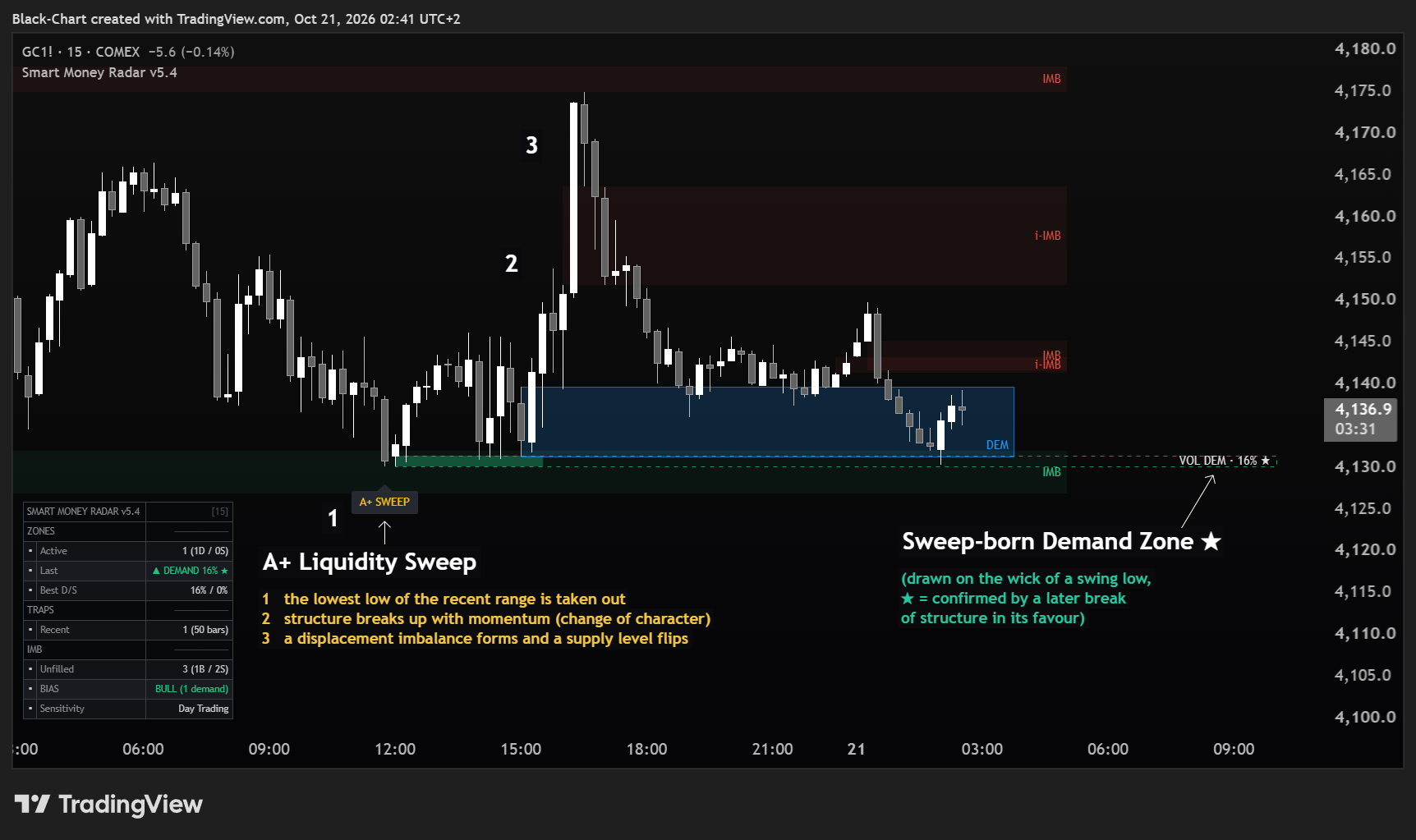
Green, with a score % and a filling bar. This is a demand area (price supported). A dashed border means it was drawn on the wick of a confirmed swing high or low; a solid border means it was born from a structure break.
Red, same logic mirrored — a supply area (price rejected). The higher the score, the fuller the bar and the more the zone is worth watching.
Blue, solid border, a terse DEM label and no score. It marks a demand zone at a break of market structure. Blue = demand.
Dark red, solid, SUP — the supply-side zone with no score. It marks supply at a break of market structure.
A confirmed liquidity grab, in two conviction levels. A: liquidity was taken beyond a swing and structure shifted in favour of the reversal (CHoCH), with a displacement imbalance. A+ (gold): all of that plus one extra sign of strength — a level that flips in favour of the move. Colour follows the side: green for grabs at a low, red at a high.
A grey ? is a sweep that just happened but hasn't confirmed yet. If structure confirms it turns into A SWEEP and, with the extra strength, A+ SWEEP; if the liquidity is re-taken, it quietly disappears.
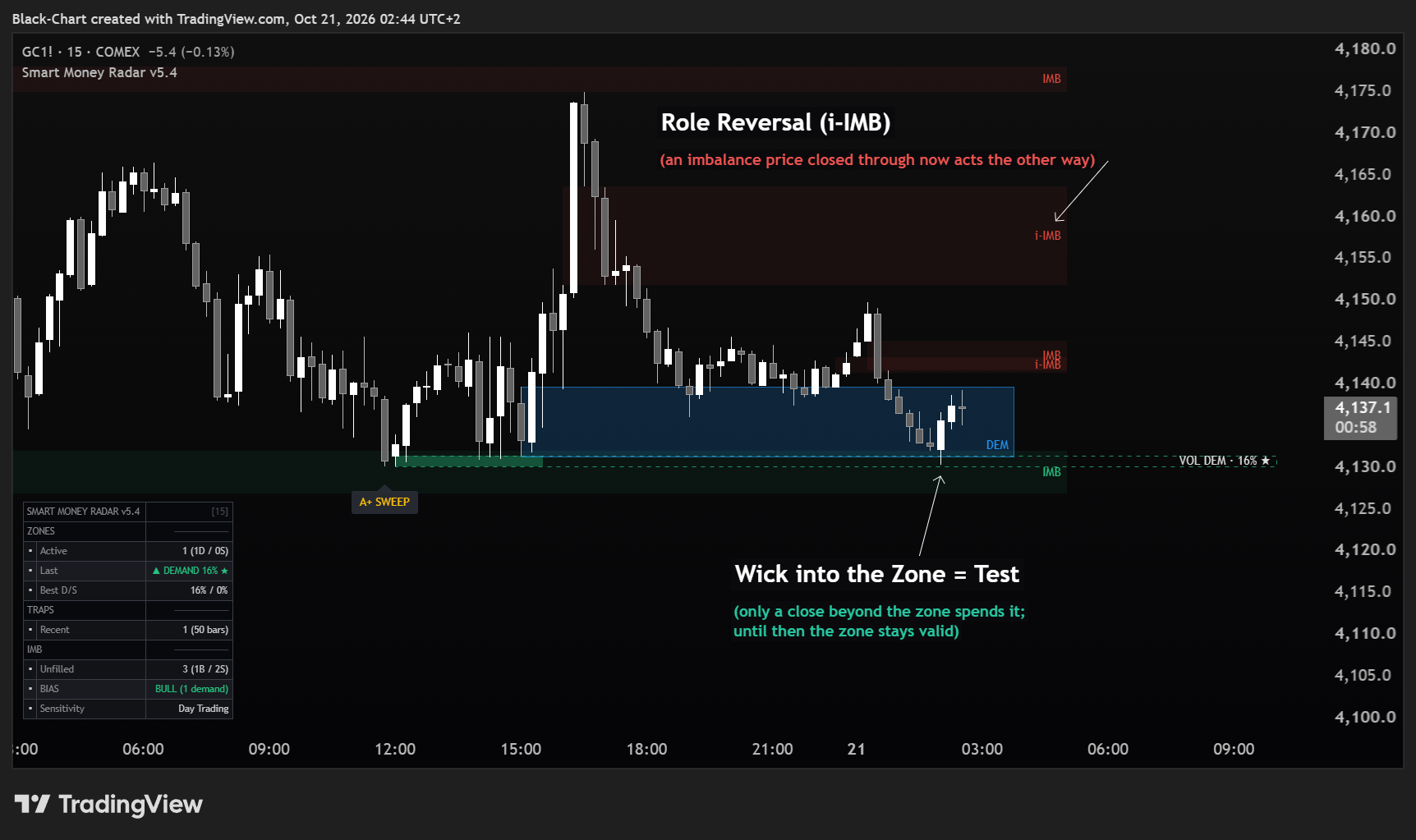
A gap left by a fast move. When a zone or gap is broken and reverses role, it re-labels as i-DEMAND, i-SUPPLY or i-IMB — a former level now acting the other way.

Score & tiers
Only the volumetric zones carry a score. It runs roughly 0–95% — think of it as the zone's quality and conviction. The inner bar fills to match.
A valid zone, ordinary conviction. Present, but not flagged.
Strong zone. Worth prioritising over unstarred ones.
Premium zone — the radar's highest-quality read.
A zone earns an extra ★ once it becomes Confirmed — meaning price has already reacted from it, and structure has since broken in its favour. Fresh zones start as candidates (not drawn in this edition), become Active when price reacts away from them once structure has shifted their way since the swing (a change of character), then Confirmed when a later structure break goes in their favour. Only the dashed, sweep-born zones carry the extra ★.
When a zone stops mattering
A zone is "spent" when price closes beyond it. A wick is not enough, and in this edition the rule is fixed. A wick poking through is treated as a test or a liquidity grab, and the zone stays valid.
Spent zones don't just vanish: by default they can flip into their inverse (i-DEMAND / i-SUPPLY) for a set number of bars, because a broken demand often becomes fresh supply. That lifespan is fixed (locked at the default). (inverted zones appear in Advanced/Custom mode, not the default Clean mode)
The settings panel
Open the indicator settings (the gear icon). Inputs are organised into numbered groups. You rarely need to touch more than two things: the Display Mode and the Structure Sensitivity — the rest is already tuned. Here's what each group does and a sensible starting value.
Changed too many settings, or is the indicator behaving oddly? No problem: open the indicator's Settings (Inputs) and click Reset settings — the button at the bottom-left of the dialog — to return everything to the correct defaults.
| Group | What it controls | Start with |
|---|---|---|
| 1 · Modules | Master on/off switches — zones, sweep-born vs structure-born zones, liquidity sweeps, imbalances. Turn a whole feature off here. | on · imbalances off |
| 2 · Supply/Demand Zones | How many zones to keep, how far they extend, hide overlaps, and a zone's maximum age in Clean mode. | defaults |
| 3 · Structure Sensitivity | A single preset that tunes the sensitivity of swings, liquidity sweeps and zones by timeframe: Auto · Scalping · Day Trading · Intraday · Swing · Position. The dial that matters most after Display Mode. | Day Trading or Auto |
| 3b · A+ Sweep Grading (Behavioral) | The sweep-candidate marker: show or hide the grey ? before it matures into A / A+. | on |
| 4 · IMB / Imbalance Settings | Max imbalance boxes and how far they extend on the chart. | defaults |
| 5 · Color Theme | Every colour: demand green, supply red, the gold A+ label, the inverted-zone colours, plus zone and box transparency. The structural DEM / SUP colours live in group 9. | to taste |
| 6 · Dashboard | The on-chart summary panel — Off, Minimal or Full — plus its position and size. The SENS row shows the active sensitivity level. | Off |
| 8 · Hybrid Engine | The confirmed ★ on zones — it marks a sweep-born zone confirmed by a later structure break. | on |
| 9 · Structural Zones (DEM / SUP) | The plain, unscored DEM / SUP layer (show/hide it) and its two colours. | on |
Two zone families, one radar. A label starting with VOL is a volume-scored zone — it carries a %. A plain DEM / SUP is a structure zone with no score. Same chart, two independent reads — where they overlap, that's confluence.
Structure Sensitivity — the dial that tunes the whole radar by timeframe. A single preset decides how pronounced a swing must be to count — and that governs how many liquidity grabs, zones and structure breaks the radar marks. Scalping = most reactive (low charts, up to M5) · Day Trading = default (up to M15) · Intraday = M30–H1 · Swing = H2–dailies · Position = weeklies. Auto picks the level on its own from the chart timeframe — up to 5m Scalping · up to 15m Day Trading · above 15m up to 1h Intraday · up to 1D Swing · above that Position: open it on M5 and it works fine, move to Daily and it turns selective, with nothing to touch. Step up for a cleaner, more selective chart; step down to catch more local reversals.
Notifications
Smart Money Radar exposes six conditions to the TradingView alert panel. Open the alert clock, choose Smart Money Radar as the condition and pick the entry from the dropdown. None of them is active until you create it.
| Entry in the panel | What it detects | Message sent |
|---|---|---|
| Liquidity Sweep HIGH | A prior swing high is taken out and the bar closes back below that level — or the bar is rejected from its own high with a long upper wick. Either way, on qualifying volume. | Smart Money Radar: Liquidity sweep on highs - prior swing high taken out and bar closed back below it, or long upper wick rejection, on qualifying volume |
| Liquidity Sweep LOW | A prior swing low is taken out and the bar closes back above that level — or the bar is rejected from its own low with a long lower wick. Either way, on qualifying volume. | Smart Money Radar: Liquidity sweep on lows - prior swing low taken out and bar closed back above it, or long lower wick rejection, on qualifying volume |
| MSB BULL (Demand Zone) | Price closes beyond the last swing high: a bullish break of structure, from which a demand zone may be born. | Smart Money Radar: Market Structure Break bullish - price closed beyond the last swing high |
| MSB BEAR (Supply Zone) | Price closes beyond the last swing low: a bearish break of structure, from which a supply zone may be born. | Smart Money Radar: Market Structure Break bearish - price closed beyond the last swing low |
| IMB BULL | A bullish imbalance has formed: a gap left behind as price moved up. | Smart Money Radar: Bullish Imbalance detected |
| IMB BEAR | A bearish imbalance has formed: a gap left behind as price moved down. | Smart Money Radar: Bearish Imbalance detected |
They describe the event, never the consequence. An alert says something has just happened on the chart, and stops there: it does not say what the market will do, suggests no direction, and is not an entry or exit signal. A sweep on the highs says an extreme was pierced and rejected — not that price will reverse. The message you receive is exactly the one in the table.
Starting points
Not rules — just sensible starting configurations. Adjust to your instrument and style.
Putting it together
One repeatable way to use the radar. It describes what to look at, in what order — it does not tell you to trade.
Start in Clean mode. Note the one demand and one supply the radar considers most important right now, and their scores.
Does a plain DEM / SUP zone sit at the same level as a scored VOL zone? Two reads agreeing is stronger confluence than one alone.
As price reaches a zone, watch for a grey ? to resolve into an A SWEEP and, with extra strength, a gold A+ SWEEP — the radar's top grade: liquidity was taken and the reversal confirmed.
The zone stays valid while price only wicks it. A close beyond spends it — and may flip it into an inverse zone to watch next.
Access a professional toolset built on Wyckoff logic, volume, and liquidity. No automation. No simplification. Only structure.