A Wyckoff context engine. It reads the market through Wyckoff's three laws — supply & demand, cause & effect, effort & result — and tells you what phase you are standing in. It does not tell you when to enter. That judgement stays yours.
The idea
Most tools answer "what should I do?". Deep Flow answers the question that comes first: what is the market actually doing right now?
It builds price into waves, measures the volume behind each one, and runs that through Wyckoff's three laws. The output is a read of market phase, the pressure behind it, and how mature the current cause is — presented as a dashboard, not as trade signals.
Who is actually in control — buying versus selling pressure, read in context rather than raw.
How much cause has been built. A bigger, more mature range implies a bigger potential effect.
Whether volume is producing movement — or being absorbed without progress.

Quick start
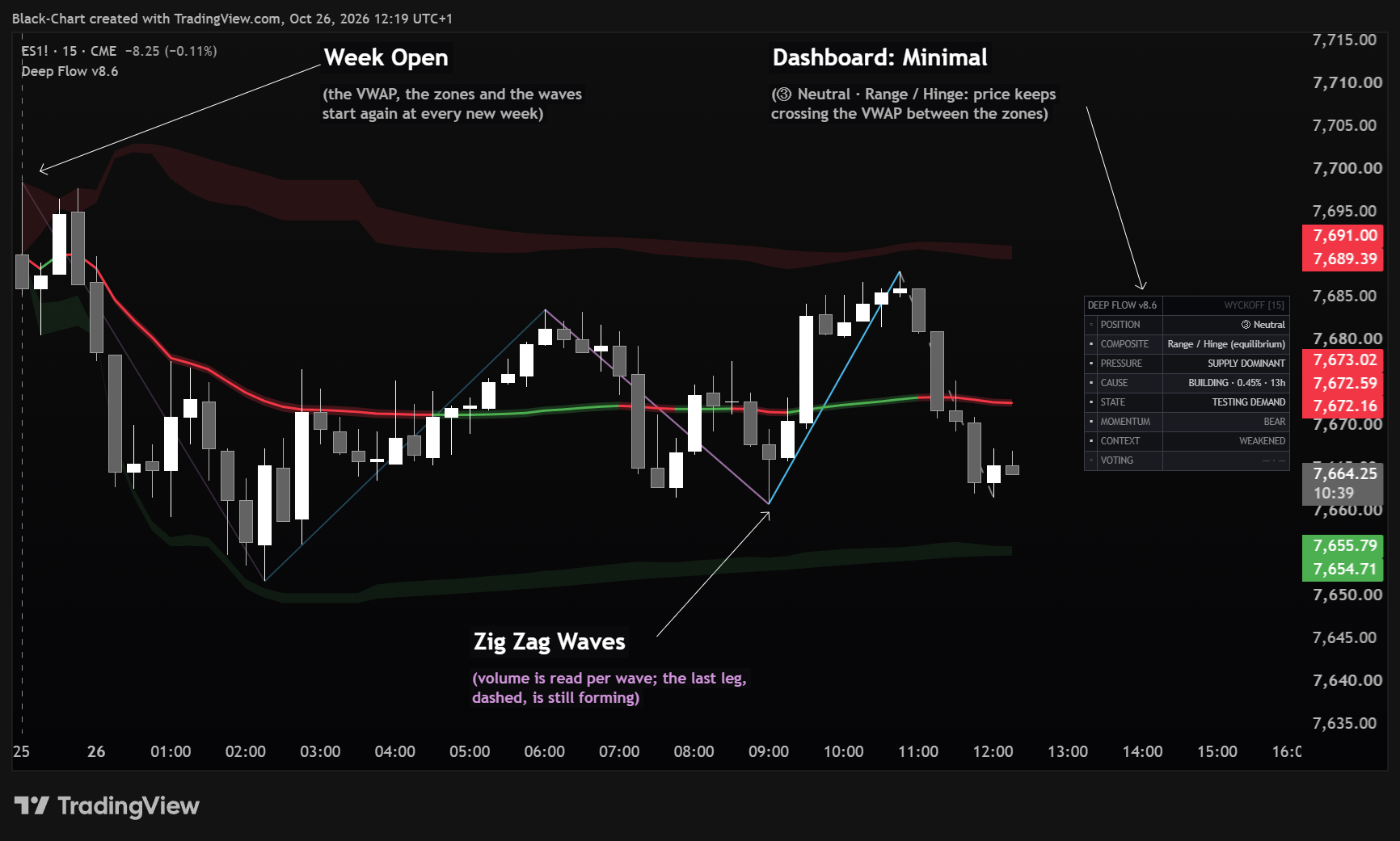
Deep Flow measures everything from an anchored range. By default (Reference Period: Week Open) the measurement starts at the open of the current week, in the instrument's exchange timezone rather than yours, and restarts on its own every week — nothing to set. Want to read the day, the month, or a point you pick by hand? The other three entries in the dropdown do exactly that: Today, Month Open, Manual (drag).
The Wave Preset menu sets wave sensitivity. The default is Auto: it picks the level from the chart timeframe on its own — up to 5m Scalping · up to 15m Day Trading · above 15m up to 1h Intraday · up to 1D Swing · above that Position. Prefer to fix it yourself? Choose Scalping · Day Trading · Intraday · Swing · Position. Every level works on any instrument with no retuning, because it adapts to volatility. Right-sized waves are the foundation for everything downstream.
Start on Minimal. Eight lines tell you position, who is pressing, how mature the cause is, whether effort is producing result, and how the recent waves compare.
Why the preset works everywhere. It sizes the wave by the instrument's volatility, not by a fixed percentage: the same choice yields consistent waves on FX, indices, gold or crypto and on every timeframe. With Auto, the default, you don't even pick the level. In the Full dashboard the PRESET row always shows which level is active.
Early in a period you may see little — that's normal. Deep Flow measures everything from the anchor: with Week Open the anchor restarts at the week's open, so the range holds very few bars. On high timeframes (H4, Daily) Monday morning Deep Flow can look almost empty. Two ways to fill it right away: (1) drop to a lower timeframe (e.g. from Daily/H4 to H1/M15) — the same week holds many more bars, so the reading populates instantly; (2) or switch to Month Open, which opens a much wider window. ⚠ Dragging the handle works ONLY in Manual (drag): in the other entries the anchor is computed from the calendar and the drag is ignored.
Deep Flow needs volume. Volume comes from the data feed of the symbol; on many forex and CFD symbols it is the provider's tick volume. Without volume there is no VWAP, no zones, no sweeps, no trend context and no volume reading: STATE stays NEUTRAL and PRESSURE BALANCED, while VOTING and the schematic can still read the speed and extent of the waves. Deep Flow is meant for symbols with volume.
On the chart
An anchored VWAP with a dynamic fill, plus supply and demand ribbons set at a deviation multiple. This is the reference frame everything else is measured against — the "fair value" spine of the range.
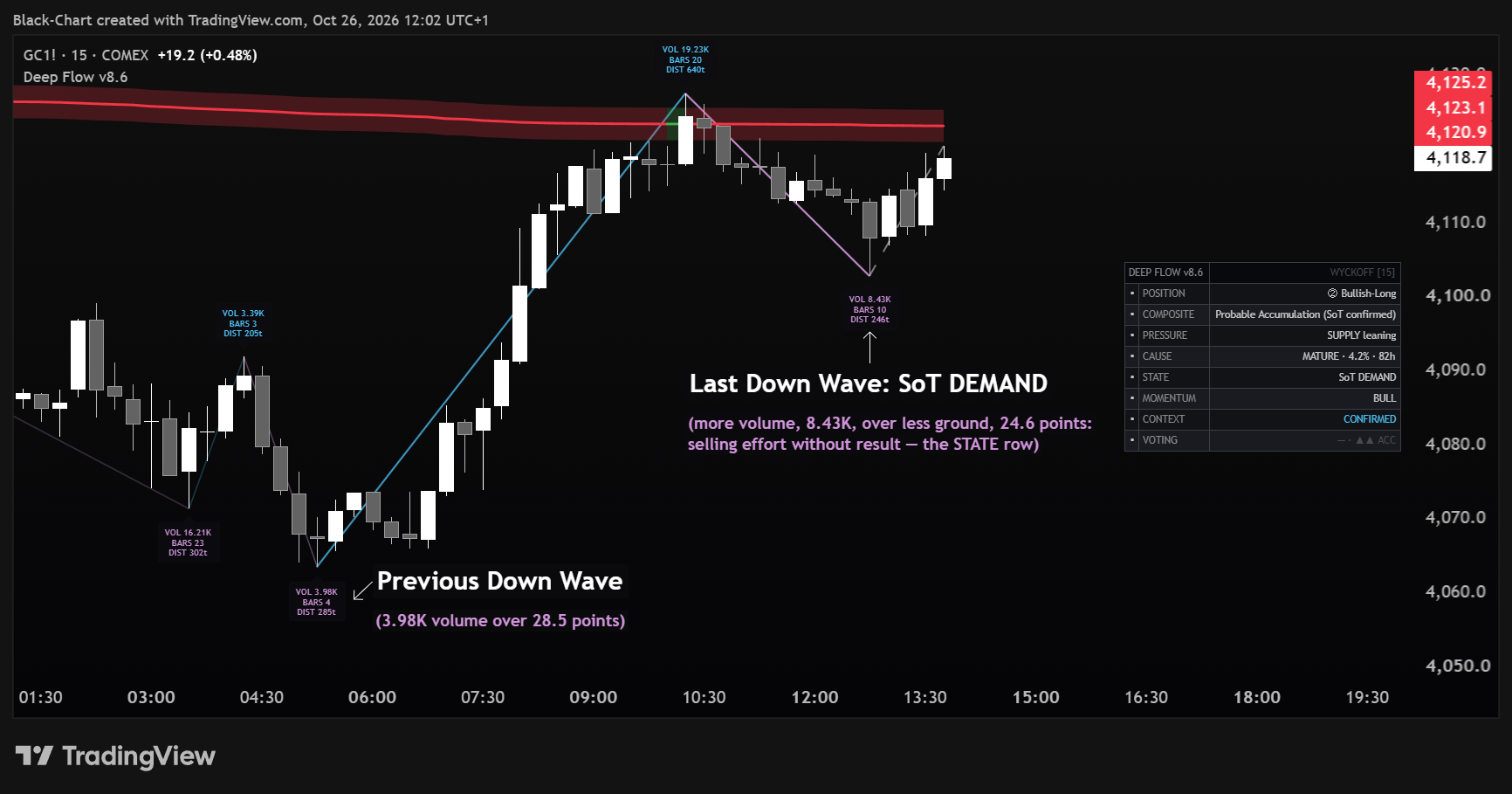
The ZigZag of completed waves, each annotated with its volume, bar count and distance. Cyan for up waves, violet for down waves. The active leg is dashed so you can tell it apart from confirmed history. (labels are off by default — enable them with Wave Telemetry → Show Wave Telemetry Labels)
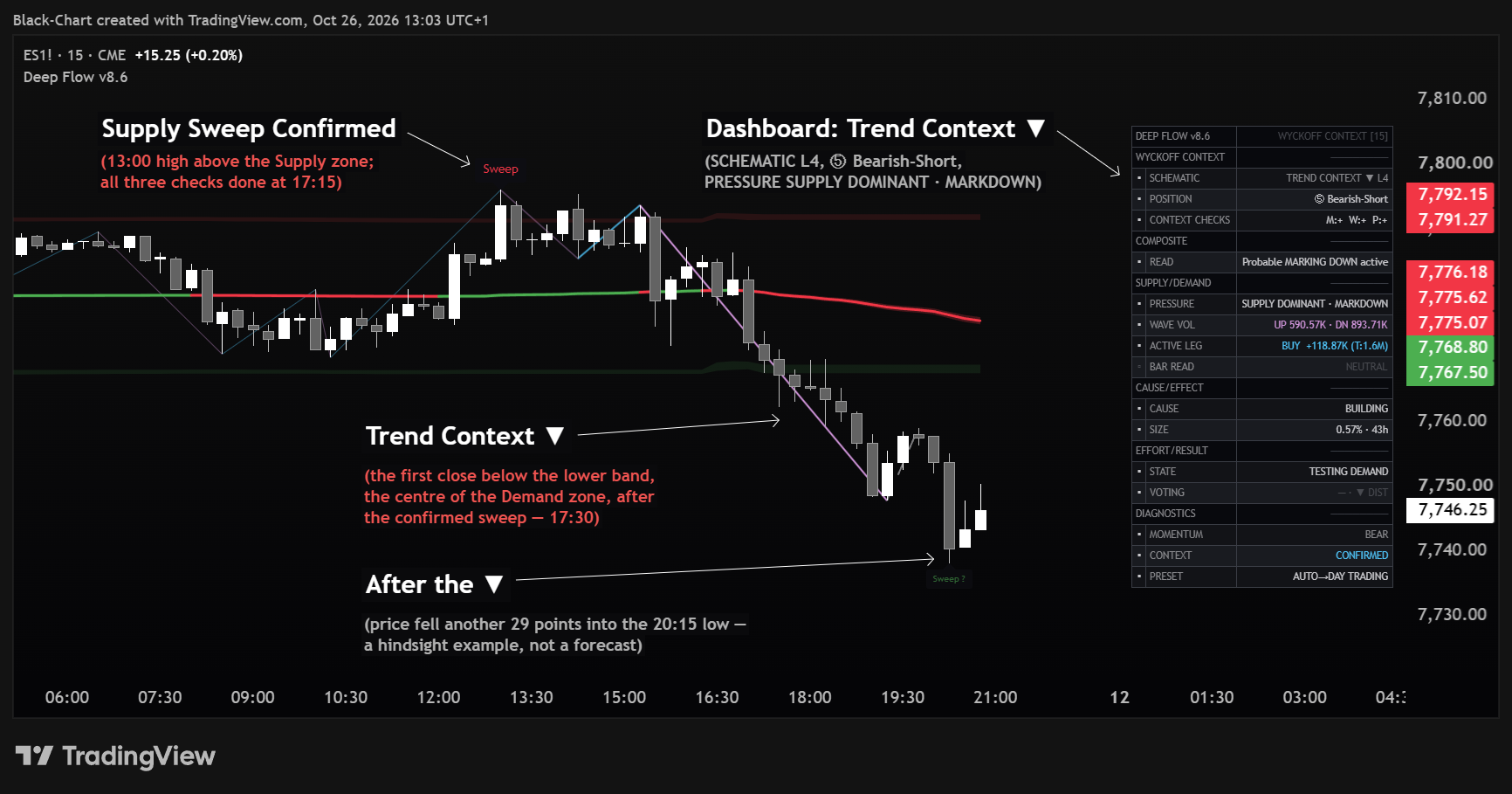
When price takes liquidity beyond a supply or demand zone, a small, faint Sweep ? appears at the extreme and follows any new extreme. It becomes a full Sweep, in the colour of the zone, only if, within a limited number of bars, price closes back beyond the zone's inner edge, breaks structure in the direction of the reversal and leaves an imbalance. If price keeps closing outside the zone, or the extreme is taken again, the candidate disappears. A confirmed Sweep also arms the trend context: after it, the first close beyond a deviation band is enough to start TREND CONTEXT in SCHEMATIC. A Sweep marks an event that has happened — it is not an entry signal.
With Horizontal Zones: Freeze on Breakout on (default), when price breaks decisively out of the zones they lock at their levels instead of chasing price — the right read for a horizontal range. With Enable Thaw on (default) they unlock if price comes back and holds between them. For a sloped range turn the switch off: the zones then always follow the VWAP.

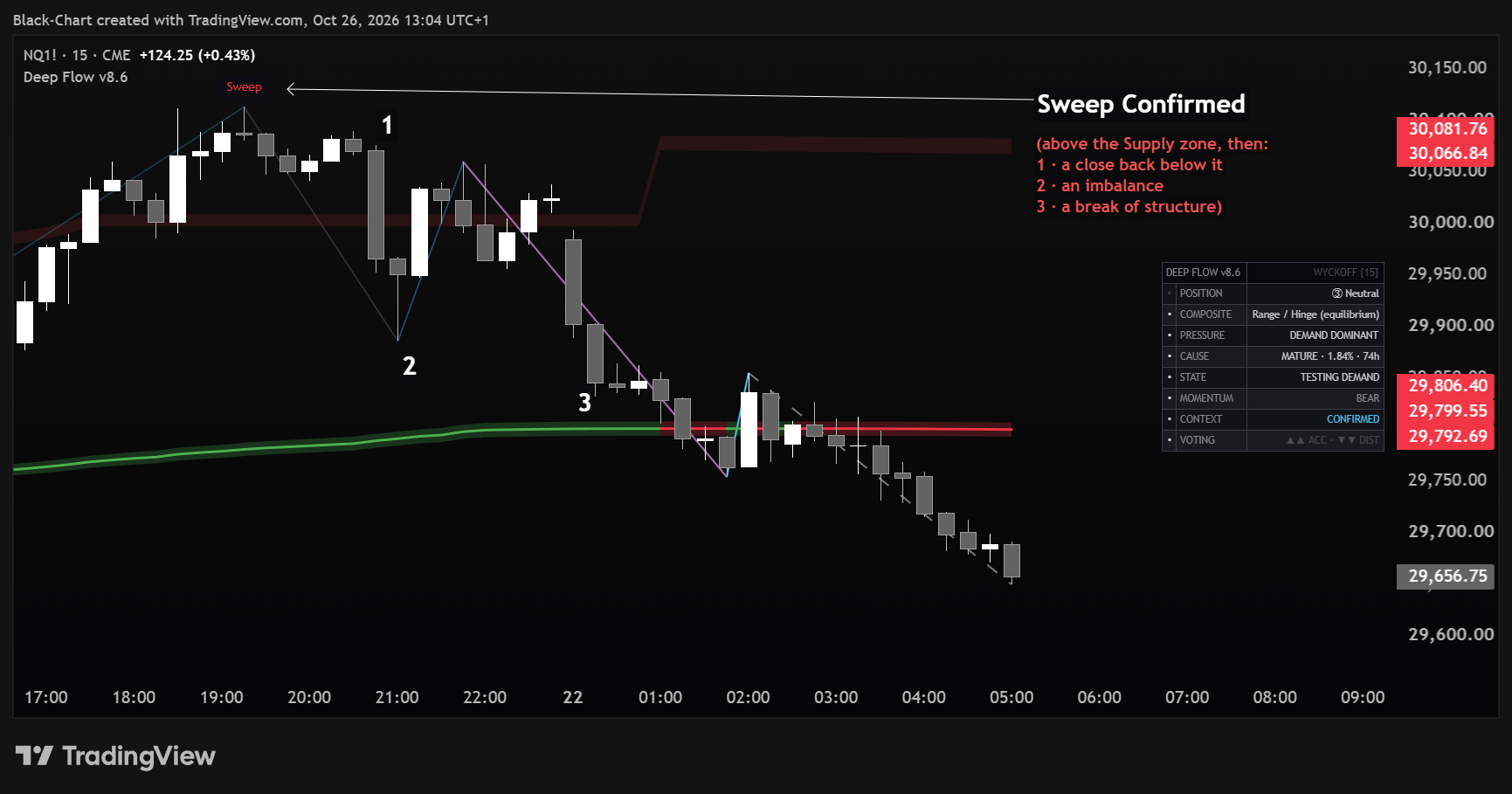
Candle colouring by wave and VWAP side is available but off by default, so the chart stays readable. Above the VWAP a candle is green in an up wave and blue in a down wave; below the VWAP it is red in a down wave and orange in an up wave; near the VWAP it is grey. The wave direction changes when a new wave is confirmed, and a colour already drawn is never repainted. Up-wave and down-wave volume, tail and total are also exported to the Data Window.
When the trend context starts and ends. TREND CONTEXT ▲ or TREND CONTEXT ▼ starts when price closes beyond a deviation band — the centre line of a zone — and the close is backed by a reading on the same side or by a decisive candle with volume, or, after a confirmed Sweep, by the first close beyond a band. No trend context starts in the first candles of a new range, while the bands are still forming. It ends after a few consecutive closes back inside the bands. After a trend, SCHEMATIC remembers it as POST-MARKUP ▲ or POST-MARKDOWN ▼ until price has closed back inside for several candles and the readings have turned to the other side; like the trend context itself, that memory starts again at every new anchor.
The heart of it
Deep Flow's output is the dashboard. Three modes let you choose how much you want in front of you.
No panel at all. A completely clean chart for studying the tape.
Eight essential reads: position, the composite read, the three laws, two diagnostics and the wave vote.
The complete Wyckoff read, organised into five labelled layers plus diagnostics.
Minimal — the eight essentials
Full — five Wyckoff layers
| Row | What it tells you |
|---|---|
| POSITION | Where you stand in the cycle, as a five-state read: Bullish-Short, Bullish-Long, Neutral, Bearish-Long, Bearish-Short. It is a proprietary classifier inspired by Wyckoff's Position Sheet, not the original method. |
| CONTEXT CHECKS | Three context checks, stated plainly and with no composite score. M strong macro context, W waves aligned, P position relative to VWAP. Each check reads +, - or — when not applicable. |
| SCHEMATIC | The macro schematic being tracked (accumulation, distribution, trend context…) plus a consensus level. |
| COMPOSITE / READ | The probable intent behind the tape, stated honestly as probable, possible, or range / testing. On the chart the full wording appears, for example “Probable Accumulation (SoT confirmed)”. |
| PRESSURE | Law 1. Who is pressing — supply or demand — read in context. |
| WAVE VOL · ACTIVE LEG | Total volume traded during up waves and during down waves — labelled "UP … · DN …" — and the volume accumulating in the current leg versus the total. This is not order flow: it does not separate buyers from sellers, it measures total volume per wave direction. |
| BAR READ | The current bar's tape character. NEUTRAL when none applies; otherwise selling or buying climax, stopping volume, absorption, effort > result, test, no demand test, no supply test, easy move. The arrow marks the side. |
| CAUSE · SIZE | Law 2. How mature the cause is (immature → building → mature → complete) and how big it is, as range width % and duration in hours. |
| STATE | Law 3. Shortening of thrust (SoT) or effort-versus-result (E/R), on the demand or the supply side; otherwise which side price is testing. |
| VOTING | Wave dynamics — the last two up waves against the last two down waves, by speed and by extent. Two arrows mean a wider gap than one; when the two votes agree the row is highlighted. |
| MOMENTUM · CONTEXT | Diagnostics: directional bias (BULL, BEAR or FLAT), and whether the recent waves confirm, weaken or contradict the macro read. |
| PRESET | Full mode only: the active Wave Preset level. With Auto it shows the level chosen for the chart timeframe. |
Context checks
In Full mode, the CONTEXT CHECKS row shows three independent checks, for example M:+ W:+ P:—. There is no overall verdict: each check is read on its own.
M — macro context. Positive when the schematic is tracked with strong consensus.
W — Wave Context. Positive when the waves confirm the macro read rather than weakening or contradicting it.
P — position relative to VWAP. While cause is being built, it reads favourable when price trades at a discount (for a bullish context) or at a premium (for a bearish one); once an effect is running, it is favourable for price to ride the VWAP in the direction of the trend.
Check satisfied
Check not satisfied
Not applicable: no valid context direction, VWAP unavailable, or you are outside the anchored range
This is not a validator, a rating, or permission to trade. The three checks describe the state of the context — nothing more. The only event Deep Flow marks on the chart is the Sweep on the zones; it prints no direction calls, no targets and no composite score. The decision, and Wyckoff's nine tests, remain yours to apply.
A — state is not a negative verdict: it means the check is meaningless at that moment. A P:— during a structural-memory read is correct, because direction there comes from prior context rather than current macro evidence.
Settings
This edition exposes only the controls that actually matter. The Wyckoff engine — macro-classification thresholds, effort/result balance, Sweep confirmation, freeze timing, reactivity — is pre-configured at validated values and works on its own. In practice you pick anchor and dashboard, and decide whether your range is horizontal or sloped.
Why so few settings. Deep Flow's internal logic is calibrated and locked at validated values: it removes the adjustments that can degrade the read and keeps behaviour consistent across every instrument and timeframe. Changed something and want to go back? Open Settings (Inputs) and click Reset settings.
| Group | What it does | Advice |
|---|---|---|
| Wave Detection | Wave Preset (Auto / Scalping / Day Trading / Intraday / Swing / Position) — how waves are built. Auto, the default, picks the level from the chart timeframe on its own. | Auto |
| Anchored Range | Reference Period — the dropdown that picks where the engine starts counting: Today, Week Open (default), Month Open, Manual (drag) — plus the Start Date/Time used by the manual entry alone. Everything is measured from here. | Week Open |
| Dashboard Options | Mode (Off / Minimal / Full), position and size. | Your preference |
| Master Structure Lock | Anchors the VWAP, the zones and the macro read to a higher timeframe of your choice. Off by default. | Default (off) |
| Structural VWAP & Ribbons | VWAP colours, dynamic fill, supply/demand ribbons, deviation multiplier. | Default / to taste |
| Breakout Freeze | Horizontal Zones: Freeze on Breakout — on, the zones lock when price breaks out (horizontal range); off, they always follow the VWAP (sloped range). Enable Thaw unlocks them automatically when a breakout fails. Both on by default. | Default · off for sloped ranges |
| Sweeps (anchored zones) | Show Sweeps on the Zones — shows or hides the Sweep ? and Sweep markers. Hiding them does not change the dashboard read. | On |
| Wave Telemetry · Visual FX | Wave labels, ZigZag lines, active leg; candle colouring by wave and VWAP side, with its five colours and the Near VWAP distance. | To taste |
Putting it together
What to look at, in order. This describes how to interpret the panel — not what to trade.
Set the start of the range you actually want analysed. A wrong anchor produces a confident-looking but meaningless read. Pick the entry from the Reference Period dropdown (see below).
Read POSITION and COMPOSITE. Which phase are you in, and how confidently is it stated?
PRESSURE — who is in control. CAUSE — how much has been built. STATE — is effort producing result. Agreement across the three is what matters.
Watch whether a Sweep confirms at the zone edges and SCHEMATIC shifts to TREND CONTEXT, and use CONTEXT CHECKS to see which checks hold and which don't — then apply your own tests before doing anything.
The dropdown decides where the engine starts counting. Everything else follows from it: change it and volume, balance, waves and classification change too, because you are asking the market a different question.
| Entry | Measures from | When to use it |
|---|---|---|
| Today | Today's regular session open — not the pre-market. | Intraday reading, one day at a time. |
| Week Open | The current week's open, in the exchange timezone. Default. | Day-to-day context: it restarts on its own every week. |
| Month Open | The current month's open. | A wide window, for cause that builds across weeks. |
| Manual (drag) | The point you choose, which stays put until you move it. | Studying a historical schematic or a specific range. |
Start Date/Time is a secondary control. It counts only with Manual (drag): in the other three entries the anchor is computed from the calendar and the input's value is never read. The handle stays visible and draggable on the chart outside Manual too — TradingView draws it, not the indicator — but dragging it has no effect: to move the anchor by hand, first set the dropdown to Manual (drag).
Each entry defines a window of fixed duration: on the wrong timeframe that window holds too few bars — or far too many. Below, the bar counts at a full period on a continuously traded instrument; early in a period there are fewer. Highlighted are the combinations that give a sensible reading.
| Timeframe | Today | Week Open | Month Open |
|---|---|---|---|
| 5m | 288 bars | ~2,000 bars | ~8,900 — huge window |
| 15m | 96 bars | 672 bars | ~2,970 bars |
| 1h | 24 bars | 168 bars | ~740 bars |
| 4h | 6 bars — too few | 42 bars | ~185 bars |
| 1D | 1 bar — unusable | 7 bars | ~31 bars |
Access a professional toolset built on Wyckoff logic, volume, and liquidity. No automation. No simplification. Only structure.